
Find Your Favorites Fast with the FREE Grow.Me App
Search for and organize your favorite blog posts (and recipes) with the new Grow.me app. It’s so easy to use and Free! Come with me as we walk through the easy steps to get started.
“How can I search for recipes and blog posts on your site?”
This is one of the most frequently asked questions and feedback I’ve gotten from readers about the reader experience of my blog. No matter where and how I insert search bars, they seem to be hard to find!
I’m so excited to announce I have a new feature on the blog that will not only help with the search feature, but also a cool way to save and bookmark your favorite posts to find easily later.
Introducing Grow.Me to the Rescue!
A tool was developed to help give readers an easy way to bookmark, save, and search for posts on blogs called “Grow”.
You will see a little heart and sideways fan icon in the lower right hand corner of this post and thousands of other blogs, too. Those are part of the Grow system that makes it easy to search for and save posts to refer to later.
Here is a video on the super easy steps to get started, and how it works:
How to Get Started Using Grow using the Heart Icon
One of the ways to start using the Grow app is simply by clicking on the heart in the lower right hand corner. Then it will prompt you to start your Grow.me account. I’ve listed the steps below. It’s easy!
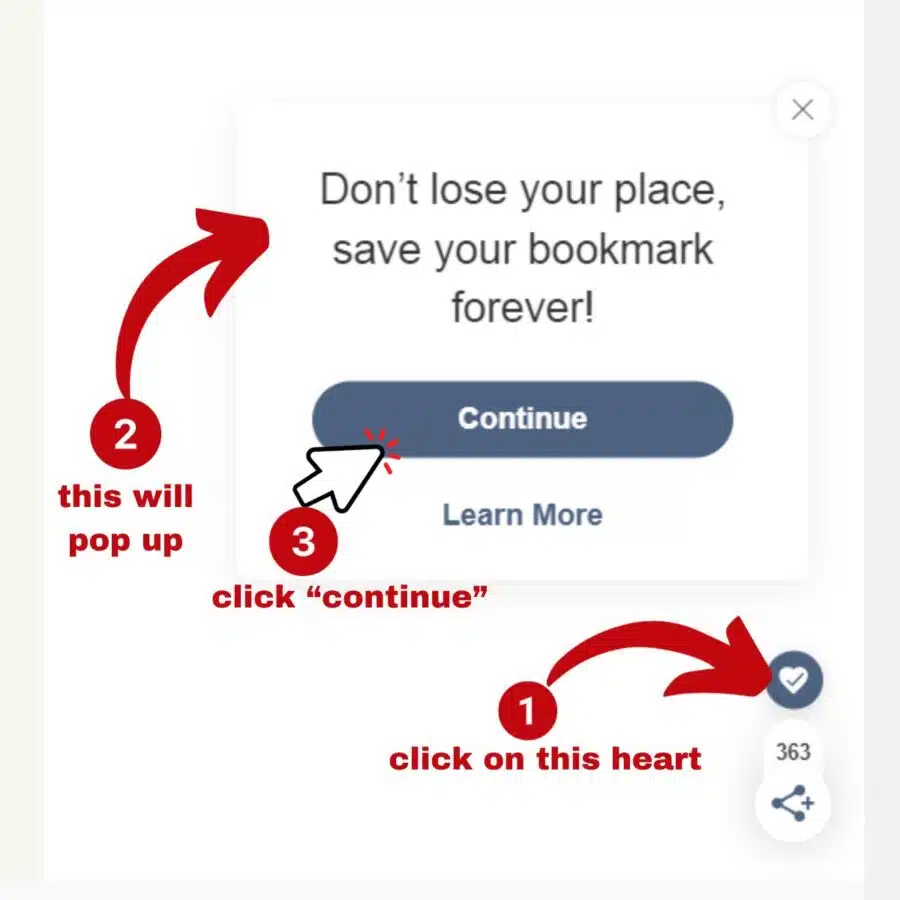
- Click on the heart in the lower right hand corner of the blog post you’d like to save/ bookmark (even this post would work!).
- A box will pop up asking if you would like to save your bookmark forever. (Yes, you would!;)
- Click the continue button.

- A form will pop up where you can enter your email address and create a password (or you can sign up with google or facebook.)
That’s it! Now you have unlocked the super snazzy features of saving and searching for your favorite posts!

How to bookmark your favorite articles and recipes with the Grow.me app
Did you find a super helpful article like how to clean glass shower doors or a recipe like meatloaf that you want to refer to later? The Grow app makes it super easy! Just click the heart in the lower right hand corner to save the article, OR the recipe card has a save button, too! They make it easy peasy for you.
Here’s a picture of the recipe card save feature:

You can use the Grow features on thousands of your favorite blogs!
The nice thing about the Grow features is that you can access and use them with many different blogs. There are already thousands of blogs who are using this neat feature! Once you create and log into your grow account, you can use it seamlessly between many different blogs.
How to access your Grow.me bookmarks later.
To access your bookmarked/ saved posts, just click on the sideways fan icon in the lower right hand corner. A box will pop up that you can click on to access both the bookmarks and search feature.

You can also access all your bookmarks by signing into your grow.me account.
Make sure you remember your grow.me account password, but don’t worry. If you forget it, you can just click on the “forgot my password” feature and they’ll email you telling you, you can reset it.
I hope you love using this new feature!!




DON’T MISS A THING!
Join my list for more ideas for you and your home…